Looking for an online raffle maker? Whether you need to create a simple drawing for a classroom fundraiser or build a full-featured raffle for a 500-person gala, the tool you choose shapes the entire experience. This guide compares every major approach -- from free DIY methods to dedicated raffle platforms -- so you can pick the right online raffle maker for your event, budget, and audience.
What Is an Online Raffle Maker?
An online raffle maker is any web-based tool that helps you create, manage, or run a raffle. The term covers a broad range of tools, from simple random number generators to full platforms that handle ticket creation, sales, drawing, and winner notification.
Most people searching for a "raffle maker online" need one or more of these capabilities:
- Raffle creation: Setting up ticket numbers, prize details, and event rules
- Ticket management: Tracking sold vs. unsold tickets and managing participant data
- Online ticket sales: Selling raffle entries through a website or payment link
- Drawing and presentation: Randomly selecting winners with a visual display
- Winner notification: Contacting winners and documenting results
No single tool does everything perfectly. The key is understanding which capabilities matter most for your event and choosing accordingly. For a general overview of raffle creation, our raffle maker guide covers the fundamentals of building any type of raffle from scratch.
DIY Methods: Making a Raffle with Free Tools
Before investing in a dedicated platform, many organizers try building a raffle with tools they already have. Here is how the most common DIY approaches work, along with their limitations.
Google Forms + Random Number Generator
The most popular free approach is using Google Forms to collect entries and a random number generator to pick winners. Here is the typical workflow:
- Create a Google Form with fields for name, email, and ticket number
- Share the form link with participants
- Export responses to Google Sheets
- Use Random.org or Google's built-in random number feature to select a winner
- Manually contact the winner
Pros: Completely free, familiar tools, easy to set up for small groups.
Cons: No payment processing, no visual presentation for live events, manual record-keeping, no duplicate entry prevention, does not scale beyond 50-100 entries without significant effort.
Spreadsheets (Excel or Google Sheets)
Some organizers build entire raffle systems in spreadsheets, using formulas for random selection and conditional formatting for visual tracking. This works for technically inclined organizers running small raffles.
Pros: Free, highly customizable, good for data analysis.
Cons: Significant setup time, not presentable to an audience, error-prone with manual data entry, no built-in payment handling.
Social Media Drawings
For informal giveaways, some organizations run raffles through Facebook, Instagram, or Twitter by having people comment or share a post and then using a random comment picker to select winners.
Pros: Free, great for engagement and reach.
Cons: Cannot collect payment (making it a giveaway, not a raffle), limited to platform users, difficult to verify participants, no live drawing experience.
See rafflr in Action
Watch a 2-minute demo of how easy it is to create and run a reverse raffle with rafflr
Dedicated Online Raffle Platforms Compared
When DIY methods are not enough, dedicated raffle platforms step in. Each focuses on different parts of the raffle workflow. Here is how the major options compare.
rafflr -- Best for Live Raffle Drawings
rafflr is purpose-built for the drawing and presentation side of raffles. It does not handle ticket sales, but it is the strongest tool available for running the actual live draw at an event.
- Full-screen presenter mode with animations optimized for projection
- Responsive ticket grid for up to 1,000 tickets
- Auto-pull with adjustable speed for pacing the draw
- Native reverse raffle support with elimination tracking
- Server-saved drawing state with an internet connection
- Setup in under 5 minutes
Best for: Live events, fundraiser galas, charity dinners, and any raffle where the drawing is a featured part of the program.
Pricing: Annual subscription with no per-event fees.
RallyUp -- Best for Online Ticket Sales + Fundraising
RallyUp is a comprehensive fundraising platform that includes raffle functionality alongside auctions, crowdfunding, and peer-to-peer campaigns. It handles the entire online sales workflow.
- Online ticket sales with built-in payment processing
- Customizable raffle pages with branding
- Automated winner selection and notification
- Fundraising thermometer and social sharing
Best for: Organizations running online-only raffles or multi-campaign fundraising events.
Limitation: The live drawing presentation is basic -- fine for online drawings but not designed for projecting at a live event.
Zeffy -- Best Free Option for Nonprofits
Zeffy offers free fundraising tools for nonprofits, including raffle ticket sales. They make money by asking donors for optional tips rather than charging the organization.
- Free for qualifying nonprofits
- Online ticket sales and payment processing
- Tax receipt generation
- Basic raffle management
Best for: Budget-conscious nonprofits that primarily sell tickets online.
Limitation: Minimal drawing presentation features. No live event tools.
Rafflecopter -- Best for Online Giveaways
Rafflecopter is designed for online giveaways and contests, particularly those tied to social media marketing campaigns.
- Embeddable entry widget for websites and blogs
- Multiple entry methods (social follow, email, etc.)
- Random winner selection
- Analytics and tracking
Best for: Marketing giveaways and social media contests.
Limitation: Not designed for paid ticket raffles or live events. More of a contest tool than a raffle platform.
Platform Comparison Table
| Feature | rafflr | RallyUp | Zeffy | Rafflecopter |
|---|---|---|---|---|
| Online ticket sales | No | Yes | Yes | No (entries) |
| Live draw presentation | Excellent | Basic | Basic | None |
| Reverse raffle support | Yes | No | No | No |
| Presenter mode | Yes | No | No | No |
| Auto-pull / animations | Yes | No | No | No |
| Offline capable | Yes | No | No | No |
| Free tier | No | Limited | Yes (nonprofits) | Free tier |
| Best for | Live events | Online fundraising | Budget nonprofits | Giveaways |
For a deeper analysis of drawing-specific tools, see our best raffle software for 2026 roundup.
How to Make a Raffle Online with rafflr: Step by Step
Here is how to set up and run the numbered drawing in rafflr after the organizer has handled ticket distribution, participant payments, permits, prizes, and required records through approved processes. The drawing setup itself takes under 5 minutes.
Step 1: Create Your Account
Sign up at rafflr.io and choose your plan. There is no per-event pricing -- your subscription covers unlimited raffles for the entire year.
Step 2: Set Up Your Raffle
From the dashboard, create a new raffle. Enter your ticket range (e.g., 1-300), the raffle name, and prize details. If you have unsold tickets, you can exclude specific numbers so they will not appear in the draw.
Step 3: Configure the Draw Settings
Choose your draw format: standard raffle (draw a winner) or reverse raffle (eliminate tickets until one remains). Set the auto-pull speed if you want the software to draw automatically, or plan to draw manually one at a time.
Step 4: Launch Presenter Mode
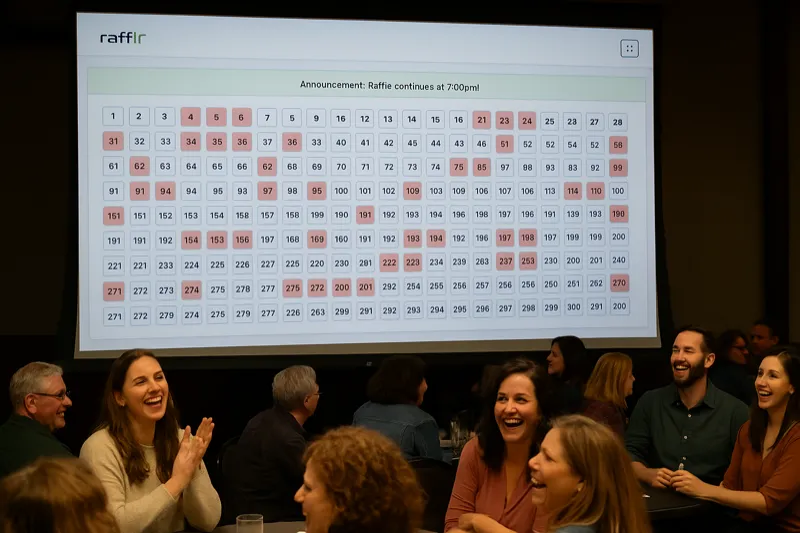
When it is time for the draw, connect your laptop to a projector and launch presenter mode. The screen fills with a visual ticket grid that the entire audience can see. Every remaining ticket is displayed, and drawn tickets disappear with animations.
Step 5: Run the Draw
Click to draw numbers one at a time, or enable auto-pull and let the software run at your configured speed. The emcee can focus on entertaining the crowd while the software handles the randomness and display.
Step 6: Announce the Winner
When the draw is complete (or the last ticket stands in a reverse raffle), the winner is displayed prominently on screen. The full draw history is saved automatically for your records.
Choosing the Right Online Raffle Maker for Your Needs
The "best" online raffle maker depends entirely on what you are trying to accomplish. Here is a decision framework based on common scenarios.
You Need to Sell Tickets Online
If your primary need is collecting payments and managing online ticket sales, look at RallyUp, Zeffy, or similar fundraising platforms. These handle the commerce side well. For the drawing itself, you can use their built-in tools or pair them with a dedicated drawing platform for a better live experience. Our online raffle guide walks through the complete process of running a raffle online.
You Need an Impressive Live Drawing
If the raffle draw is a featured part of your event program and you need to project it on a screen for an audience, choose a tool built for that purpose. rafflr's presenter mode, ticket grid, and auto-pull are designed specifically for this use case.
You Need Both Online Sales and a Live Draw
Many organizations use two tools: one for online ticket sales (RallyUp, Zeffy, or even PayPal/Venmo with a spreadsheet) and rafflr for the live draw. The ticket numbers transfer easily -- just enter your sold range into rafflr's dashboard.
You are Running a Simple Giveaway
For social media giveaways or simple online contests where no payment is involved, Rafflecopter or a Google Forms approach is sufficient. You do not need a full raffle platform for a basic random drawing.
You Want to DIY Everything
If you prefer to build from scratch, check out our guide on how to do a raffle online for a complete walkthrough of running an online raffle using free and low-cost tools.
Key Features to Look for in an Online Raffle Maker
Not all online raffle makers are created equal. Here are the features that separate good tools from great ones.
Randomness and Fairness
The foundation of any raffle is fair, random selection. Look for tools that use cryptographically secure random number generators, not simple pseudo-random functions. This matters for both actual fairness and perceived credibility.
Visual Presentation
If your raffle includes a live draw, presentation quality is critical. Can the tool project on a large screen? Does it have animations? Can the audience see every ticket and watch the draw happen in real time? These features transform a mundane number-calling exercise into genuine entertainment.
Ease of Setup
You should be able to create a raffle in minutes, not hours. Tools that require extensive configuration, custom coding, or lengthy onboarding processes create unnecessary friction. The best online raffle makers let you go from zero to ready-to-draw in under 5 minutes.
Format Flexibility
Can the tool handle your specific raffle format? Standard draws, reverse raffles, 50/50 splits, multi-prize tiers, and side pots all require different configurations. A good platform supports multiple formats without workarounds.
Record-Keeping and Compliance
Automatic documentation of ticket sales, draw results, and winner information is not just convenient -- it is often legally required. Choose a tool that maintains comprehensive records you can export or reference later.
Reliability
Your raffle draw is a live event. Downtime is not an option. Look for tools that work offline (like rafflr, which functions without internet once loaded), have strong uptime track records, and do not require constant connectivity.
Common Mistakes When Making a Raffle Online
Avoid these pitfalls that trip up first-time online raffle organizers.
Choosing a Tool Based on Price Alone
Free tools work for small, informal drawings. But if your raffle is raising money for a cause, the drawing experience directly impacts how much people are willing to donate and how likely they are to buy tickets next time. A $97/year investment in professional software can easily pay for itself through increased engagement and repeat participation.
Neglecting the Live Experience
Many organizers focus entirely on ticket sales and treat the draw as an afterthought. But the draw is the moment everyone remembers. An anticlimactic drawing of numbers from a spreadsheet leaves a different impression than a professional presentation with animations, suspense, and visual excitement.
Not Testing Before the Event
Always run through the complete draw process at least once before the event. Test the projector connection, the draw speed, the sound, and the flow. Discovering problems during the live event is stressful and undermines audience confidence.
Ignoring Legal Requirements
Online raffles are subject to the same legal requirements as in-person ones, and sometimes additional ones related to online gaming and commerce regulations. Check your state and local laws before launching. Our online raffle laws guide covers the basics.
Frequently Asked Questions
What is the best free online raffle maker?
For basic raffles, Google Forms combined with a random number generator works as a free option. However, free tools lack visual presentation features, automated drawing, and audience engagement tools. For live events where the drawing experience matters, dedicated tools like rafflr provide far better results.
Can I make a raffle online without any technical skills?
Yes. Modern online raffle makers are designed for non-technical users. Platforms like rafflr let you create a raffle in under 5 minutes by entering your ticket range, prize details, and event information. No coding or design skills required.
What is the difference between a raffle maker and a raffle drawing tool?
A raffle maker helps you create and set up the raffle -- defining tickets, prizes, and rules. A raffle drawing tool handles the actual live draw -- randomly selecting winners with visual presentations. Some platforms do both, while others specialize. rafflr focuses on the drawing and presentation side.
Do I need separate tools for selling tickets and drawing winners?
It depends on your event. Many organizations use one platform for ticket sales and a separate tool like rafflr for the live draw, especially when the drawing is a featured part of an in-person event.
How do I make a raffle online that complies with local laws?
Start by checking your state or local regulations for raffle permits and requirements. Using a digital raffle maker helps with compliance because it automatically maintains records of ticket sales, draw results, and winner information.
Start Making Your Raffle Today
The right online raffle maker saves you time, impresses your audience, and makes the entire event more professional. Whether you are running a small school fundraiser or a large charity gala, there is a tool that fits your needs. If the live drawing experience is important to your event, rafflr gives you the presentation tools that no other platform matches.