Looking for a raffle maker? The best option depends on what you need. For spinning a wheel to pick a random winner, Wheel of Names is free and instant. For creating printable raffle tickets, Canva has customizable templates. For running a professional live raffle event with a display board, rafflr sets up in 60 seconds. Here is how 7 raffle maker platforms compare.
7 Raffle Maker Tools Compared
The term "raffle maker" covers everything from free browser tools to full fundraising platforms. Here is a side-by-side comparison of the most popular options so you can find the right fit without testing them all yourself.
| Platform | Type | Best For | Price | Live Display | Online Tickets |
|---|---|---|---|---|---|
| Wheel of Names | Random picker | Quick name/number draws | Free | ✗ | ✗ |
| Canva | Ticket designer | Printable raffle tickets | Free | ✗ | ✗ |
| Raffle Creator | Online raffle | Simple online drawings | Free | ✗ | ✓ |
| RallyUp | Fundraising platform | Online fundraising campaigns | 3-5% fees | ✗ | ✓ |
| BetterWorld | Fundraising platform | Nonprofit online raffles | Free (tips encouraged) | ✗ | ✓ |
| PayBee | Event fundraising | Gala and auction events | Custom pricing | ✓ | ✓ |
| rafflr | Reverse raffle software | Live fundraising events | $77/event | ✓ | ✗ |
Which Raffle Maker Is Right for You?
The right raffle maker depends entirely on what you are trying to do. Here is a quick decision guide:
- Just need to pick a random name or number? Use Wheel of Names. It is free, works in any browser, and takes 10 seconds to set up. Paste in your list, spin the wheel, done.
- Need printable raffle tickets? Use Canva. Search "raffle ticket" in their template library, customize the design with your event details, and print. Also check out our guide to raffle ticket templates for more options.
- Running a simple online raffle? Use Raffle Creator or BetterWorld. Both let you create an online raffle page, sell tickets, and draw a winner without building anything yourself.
- Running a fundraising campaign online? Use RallyUp. It combines raffles with other fundraising tools like auctions and crowdfunding, and handles payment processing and tax receipts.
- Hosting a gala or auction event? Use PayBee. It is built for live fundraising events with multiple activities including raffles, auctions, and pledge drives.
- Hosting a live reverse raffle or drawdown? Use rafflr. It is the only platform built specifically for reverse raffles with a live display board, auto-pull drawing, buy-back rounds, and presenter controls.
A Closer Look at Each Raffle Maker
Wheel of Names (Free Random Picker)
Wheel of Names is a free browser tool that spins a wheel to pick a random winner from a list. You paste in names or numbers, click spin, and get a result. It is the most popular raffle maker for quick, informal drawings -- office pools, classroom picks, social media giveaways.
Strengths: Instant setup, fun visual spinner, completely free.
Limitations: No ticket sales, no payment processing, no participant tracking. You handle everything else yourself.
Canva (Ticket Design Templates)
Canva is a design platform with hundreds of raffle ticket templates. You customize the design with your event name, prize details, and branding, then print the tickets yourself. It solves the ticket creation problem but nothing else -- sales tracking, payments, and the drawing are all manual.
Strengths: Professional-looking ticket designs, easy to customize, free tier available.
Limitations: Design only. No online sales, no drawing tools, no automation.
Raffle Creator (Simple Online Raffles)
Raffle Creator lets you set up an online raffle page where people can enter. You configure the raffle details, share the link, and the platform handles the random drawing. The free tier covers basic raffles with limited entries.
Strengths: Free for small raffles, handles online entries, automatic winner selection.
Limitations: Limited customization, no live event features, paid tier required for larger raffles.
RallyUp (Online Fundraising Platform)
RallyUp is a fundraising platform that includes raffles as one of several fundraising activities. You can run online raffle campaigns with built-in payment processing, automatic tax receipts, and campaign pages. It charges a percentage fee on transactions rather than a flat rate.
Strengths: Full payment processing, multiple fundraising tools in one platform, professional campaign pages.
Limitations: Transaction fees (3-5%), designed for online campaigns rather than in-person events, no live drawing display.
BetterWorld (Nonprofit Online Raffles)
BetterWorld offers free online raffle tools for nonprofits. You create a raffle page, set ticket prices, and share the link. The platform is free to use but encourages donors to add a tip at checkout. It integrates with other BetterWorld fundraising tools.
Strengths: Free for organizers, purpose-built for nonprofits, easy setup.
Limitations: Tip model may confuse donors, limited event-night features, no live display.
PayBee (Gala and Auction Events)
PayBee is an event fundraising platform designed for galas, auctions, and live events. It includes raffle functionality alongside silent auctions, live auctions, and pledge drives. The platform provides a live display for event night and handles payments across all activities.
Strengths: All-in-one event platform, live display, handles auctions and raffles together.
Limitations: Custom pricing (can be expensive), complex setup for simple raffles, not specialized for any single format.
rafflr (Reverse Raffle and Drawdown Software)
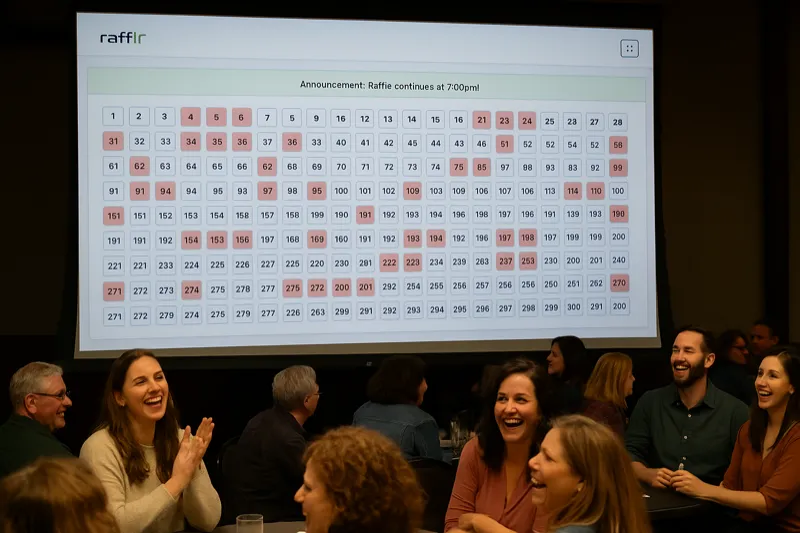
rafflr is purpose-built for reverse raffles and drawdown events. It provides a live display board that the audience watches while numbers are drawn and eliminated one at a time. Features include auto-pull timing, buy-back rounds, sponsor overlays, and a separate presenter view for the host. Setup takes about 60 seconds.
Strengths: Only platform built specifically for reverse raffles, live audience display, auto-pull drawing, buy-back mechanics, sponsor integration.
Limitations: Designed for live events, not online-only raffles. Does not sell tickets online or handle general-purpose drawings. Learn more about organizing a raffle event.
Where rafflr Fits (and Where It Does Not)
rafflr is not a general-purpose raffle maker. It is reverse raffle software designed for live fundraising events where the drawing happens on stage with an audience watching. If you need to pick a random winner from a list, Wheel of Names will do that for free. If you need to sell raffle tickets online, RallyUp or BetterWorld are better choices.
Where rafflr excels is the specific scenario of a live reverse raffle or drawdown night -- the kind of event where 200 to 500 people gather in a banquet hall, buy numbered tickets, and watch the drawing unfold on a big screen over the course of 2 to 3 hours. For that format, generic raffle makers do not have the features you need, and rafflr was built from the ground up to handle it.
See rafflr in Action
Watch a 2-minute demo of how easy it is to run a reverse raffle with professional software
Feature Comparison: Free vs. Paid Raffle Makers
The platforms above break into two clear tiers. Free tools handle one piece of the puzzle. Paid platforms automate the full workflow. Here is what each tier gives you:
| Feature | Free Tools (Wheel of Names, Canva, Raffle Creator) |
Paid Platforms (RallyUp, PayBee, rafflr) |
|---|---|---|
| Random Winner Selection | ✓ | ✓ |
| Online Ticket Sales | Limited | ✓ |
| Payment Processing | ✗ | ✓ |
| Participant Tracking | ✗ | ✓ |
| Live Event Display | ✗ | PayBee, rafflr only |
| Reverse Raffle / Drawdown | ✗ | rafflr only |
| Reporting and Tax Receipts | ✗ | ✓ |
Questions to Ask Before Choosing a Raffle Maker
- Is this an in-person event or online? -- Online raffles need platforms like RallyUp or BetterWorld. Live events need tools with display features like PayBee or rafflr.
- How many participants? -- Under 50 people, free tools work fine. Over 100, you need automated tracking and payment processing.
- What raffle format? -- Traditional draw, 50/50, reverse raffle, or multi-prize? Not every platform supports every format.
- Do you need to collect payments? -- If yes, you need RallyUp, BetterWorld, PayBee, or a similar platform. Free pickers and Canva do not handle money.
- Do you need to comply with state raffle laws? -- Fundraising raffles have legal requirements that vary by state. Check before you sell tickets.
When Free Raffle Makers Are Enough
Free tools like Wheel of Names and Raffle Creator are genuinely good options for many situations. If you are running a casual raffle with fewer than 50 participants, everyone is in the same room, and you are handling cash or do not need payments at all, a free raffle maker is perfectly fine. There is no reason to pay for software when a spinner wheel does the job.
The shift to paid platforms makes sense once you pass 100 tickets, need credit card payments, or run a specialized format like a reverse raffle. Accepting credit cards alone increases average ticket purchases by 30-50% because buyers are not limited by what is in their wallet. And automation saves 20-30 hours of volunteer labor per event -- time that is better spent promoting the event and engaging supporters.
Step-by-Step: Creating a Raffle With a Raffle Maker
Here is the typical workflow when using a professional raffle maker platform. The specific steps may vary by tool, but the process is consistent.
Define Your Raffle Before You Touch the Software
Before you log in, nail down the basics:
- Prize descriptions, values, and images
- Ticket price and whether you will offer bundle pricing (e.g., 3 for $100)
- Total number of tickets available
- Drawing date, time, and format (traditional draw, reverse raffle, 50/50)
- Legal requirements for your state -- check your state raffle laws before selling
Pick the Right Raffle Format
Your raffle maker should support the format you need:
- Traditional Raffle -- One ticket drawn, one winner. Straightforward and familiar.
- 50/50 Raffle -- Winner takes half the pot. Easy to promote because the prize grows as sales increase.
- Reverse Raffle -- Numbers are drawn one at a time and eliminated. The last remaining ticket wins. Creates sustained excitement over hours. Learn more about reverse raffles.
- Multi-Prize Raffle -- Multiple drawings for different prizes throughout the event.
Set Up Your Raffle in the Platform
With your details ready, the setup in a good raffle maker takes minutes:
- Enter raffle name, description, and prize details
- Set ticket price and quantity
- Upload your organization logo for branding
- Configure any bundle or discount pricing
- Add terms and conditions or official rules
Connect Payment Processing
If your raffle maker includes payment processing (and it should), connect your payment account so funds go directly to your organization. Look for:
- Credit and debit card acceptance
- Secure, PCI-compliant processing
- Automatic receipt generation for buyers
- Option to record cash or check payments for in-person sales
Sell Tickets and Monitor Progress
Once your raffle is live, promote it and track results:
- Share a direct link via email, social media, and text
- Print QR codes for posters and flyers
- Monitor your real-time sales dashboard to see what is working
- Send reminder messages as the drawing date approaches
Run the Drawing
This is where your raffle maker earns its keep. A professional platform provides:
- A visual drawing experience the audience can watch live
- Automatic exclusion of unsold ticket numbers
- For reverse raffles: auto-pull, buy-back rounds, and a full-screen presenter board
- A clear record of results for transparency
Common Raffle Maker Mistakes to Avoid
After working with hundreds of raffle organizers, these are the mistakes we see most often.
-
Picking a raffle maker based on price alone
A free tool that requires 20 hours of manual work is not free -- it costs you volunteer time that could be spent promoting the event. Calculate the true cost including labor before you decide.
-
Skipping the test run
Always do a complete test before your event. Buy a test ticket, check the confirmation email, run a practice drawing. Discovering a problem on event night is the worst possible timing.
-
Ignoring mobile users
More than 60% of ticket buyers will visit your raffle page on a phone. If the purchase flow is clunky on mobile, you are losing sales. Test the full buyer experience on a phone before going live.
-
Not checking your state's raffle laws
Raffle regulations vary significantly by state. Some require permits, some restrict who can run raffles, and some ban certain raffle types entirely. Your raffle maker will not check this for you -- read your state's raffle laws before selling tickets.
-
Using a traditional raffle tool for a reverse raffle
Reverse raffles have specific requirements -- auto-pull timing, buy-back mechanics, excluded numbers, a visible board -- that generic raffle makers cannot handle. If you are running a reverse raffle, use a tool built for it.
-
Forgetting about the drawing presentation
The drawing is the climax of your event. If your raffle maker just spits out a number in plain text, you are missing a huge engagement opportunity. Look for tools with visual drawing presentations, especially if you are doing a live event.
-
Not having a backup plan
Wi-Fi can drop. Projectors can fail. A good raffle maker should work on any device, so you can switch to a phone or tablet if your main setup has issues.
Raffle Maker ROI: What the Numbers Say
Organizations that switch from manual processes to a professional raffle maker consistently report higher revenue and dramatically less volunteer time spent on logistics.
Time Savings Per Event
- Ticket creation and numbering: 5 hours manually vs. 5 minutes with a raffle maker
- Payment collection and recording: 10+ hours manually vs. fully automated
- Sales tracking and reporting: 8 hours in spreadsheets vs. a real-time dashboard
- Drawing setup and execution: 3 hours of preparation vs. 10 minutes
- Winner notification and follow-up: 2 hours vs. automated
Total time saved: 28+ hours per raffle event. For organizations running multiple events per year, that adds up to hundreds of recovered volunteer hours.
Revenue Impact
Accepting credit cards alone increases average ticket revenue by 30-50% compared to cash-only events. Add online sales that let people buy tickets in advance (instead of only at the door), and many organizations see total revenue double compared to their paper-ticket days.
Raffle Maker Best Practices
Before the Event
- Run a complete test -- create a raffle, buy a ticket, run the drawing
- Train anyone who will be selling tickets on how to use the platform
- Prepare your promotion plan: email list, social media posts, printed materials with QR codes
- Confirm your prize details and official rules are finalized
- Test the drawing presentation on the actual projector or screen you will use
During Ticket Sales
- Check your dashboard daily and adjust promotion if sales are slow
- Send reminder emails or texts as the deadline approaches
- Share milestone updates ("75% of tickets sold!") to create urgency
- Make it easy for supporters to share the ticket link with friends
On Drawing Night
- Arrive early and test your setup: internet connection, projector, audio
- Have a phone or backup device ready in case of technical issues
- If running a reverse raffle, brief the audience on how it works before you start
- Announce winners clearly and share results publicly for transparency
After the Event
- Export sales data for your records and tax documentation
- Thank all participants -- buyers, volunteers, sponsors
- Review what worked and what did not while it is fresh in your mind
- Save your raffle setup as a template for next time
Bottom Line: Pick the Raffle Maker That Matches Your Event
There is no single "best" raffle maker. Wheel of Names is the best free option for quick draws. Canva is the best for printable tickets. RallyUp is the best for online fundraising raffles. And rafflr is the best for live reverse raffle events. Match the tool to the job and you will save yourself hours of frustration.
If you are planning a live reverse raffle or drawdown night, rafflr gives you the display board, auto-pull drawing, buy-back rounds, and presenter controls that generic raffle makers do not have. Setup takes about 60 seconds.