Barrel Draw Software for Reverse Raffles
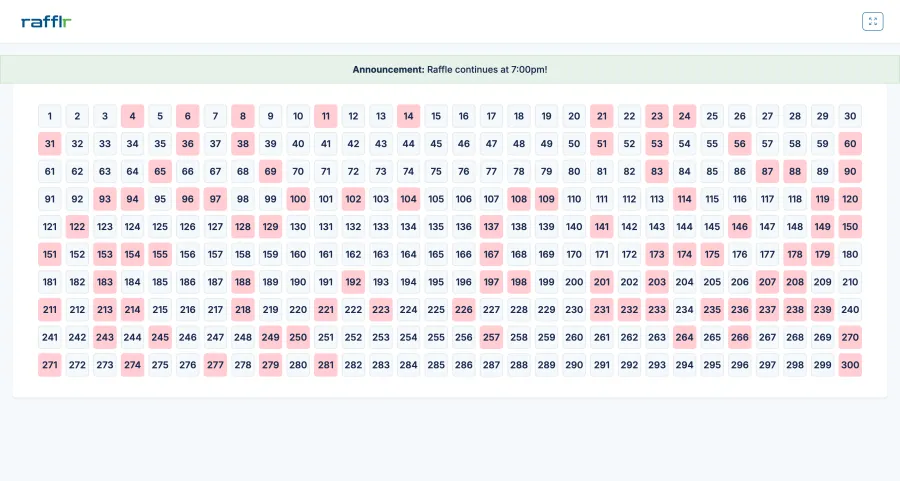
Keep the excitement of a hands-on barrel draw without tracking eliminations on a separate paper board. Pull each ticket yourself, enter its number as it is drawn, and Rafflr records the pull while your presenter board updates for the room.
Both drawing methods are included on every plan. Paid accounts also include a reusable practice raffle.
How a barrel draw works with Rafflr
One physical pull at a time. One live board everyone can follow.
Pull a paper ticket
Your team draws a numbered ticket from its barrel, bowl, or drum. In Barrel Draw, Rafflr does not choose the number.
Record the number
The operator enters that ticket number in the dashboard and selects Record Pull immediately after the draw.
Show the elimination
Rafflr saves the pull and updates the presenter board. Continue until the last eligible number remains.
Choose the drawing method that fits your event
Both methods use Rafflr's live reverse-raffle board. The difference is who chooses each ticket number.
Software selects the number
Rafflr Random Draw
Rafflr securely selects eligible numbers for you. Run pulls manually from the dashboard or use Auto Pull at your chosen pace.
You select the number
Barrel draw with live entry
Choose Barrel Draw in Rafflr, then pull tickets from your own barrel and enter each number as it comes out. Rafflr records the sequence and keeps the display in sync. A bowl or drum works too.
Keep the event moving without losing the record
A barrel draw keeps the ticket pull in the room. Rafflr provides the digital drawdown board: it records each elimination and checks entries against your ticket range, previously pulled numbers, and exclusions.
Correct a mistaken entry
If the last number was mistyped, use Undo Last Entry, then record the correct ticket. Check the number before confirming a final pull, which completes the raffle and locks the results.
Handle a genuine buyback
When an eliminated ticket is bought back under your event's rules, use Buy Back Number to return it to the raffle. Buybacks and entry corrections are separate actions.
Rehearse before the room fills
Every paid plan includes a reusable practice raffle. Before starting, open Edit, choose Barrel Draw, and save. Try entering a few numbers while watching the presenter screen.
To try the other method in your demo, select Reset Raffle and confirm, then open Edit, choose Rafflr Random Draw, and save. Reset clears practice pulls, exclusions, and buybacks; your current method stays selected until you change it.
Use your existing numbered tickets
Set the raffle's ticket count to match your event, up to 1,000. Rafflr uses whole-number tickets from 1 through that count. For 200 tickets, enter one number from 1 through 200 per pull. Names are optional; you can run the board using ticket numbers alone.
Barrel draw questions
Can we use a barrel, bowl, or drum?
Yes. Your team supplies and pulls the physical tickets. Rafflr records the ticket numbers and updates the reverse-raffle board as you enter them.
Does Rafflr randomly pick numbers in Barrel Draw?
No. The ticket pulled from your container determines the number. Choose Rafflr Random Draw instead if you want the software to select numbers.
Can we enter all the numbers after the event?
Barrel Draw is designed for live, one-at-a-time entry. Enter each number immediately after it is pulled so the presenter board follows the event.
How do we switch drawing methods in the demo?
Use Reset Raffle and confirm before opening Edit. Then choose the other method and save. Reset ends the demo session and clears its practice results. For a live event, choose your drawing method before starting; completed real-raffle results stay locked.
Is this a manual draw or a drawdown board?
Both describe part of the workflow. Your team performs the manual ticket draw, and Rafflr supplies the digital drawdown board that tracks eliminations. Choose Barrel Draw in the app to use this barrel-draw workflow.
Do we need an internet connection?
Yes. Rafflr runs in your browser and uses an internet connection to save pulls and update the presenter board. Test the operator computer, display, and venue connection together before the event.
Is Barrel Draw available on every plan?
Yes. Rafflr's plans include the same drawing methods. Compare the Pay-As-You-Go, Annual, and Lifetime options to choose the plan that fits your event schedule.
Keep the barrel. Let the board do its job.
Set up your reverse raffle, choose Barrel Draw, and practice the flow before event night.
Create Your Raffle