Need to create raffle tickets for your next fundraiser, school event, or charity drawing? An online raffle ticket generator can save you hours of design work and manual numbering. Whether you need printable tickets with tear-off stubs or fully digital tickets that participants purchase on their phones, the right tool makes all the difference. In this guide, we review the 8 best raffle ticket generators online and help you pick the one that fits your event.
What Is an Online Raffle Ticket Generator?
An online raffle ticket generator is a web-based tool that helps you design, number, and produce raffle tickets without needing graphic design software installed on your computer. These tools range from simple template editors where you customize a pre-made design and download a PDF, to full raffle management platforms that generate digital tickets, handle sales, and run drawings automatically.
The key advantage of using an online generator over manual methods is speed. Instead of typing numbers one by one into a Word document, a good generator handles sequential numbering, consistent formatting, and professional layouts in seconds. Some tools focus exclusively on producing printable ticket sheets, while others — like dedicated raffle apps — skip paper entirely and manage the entire raffle digitally.
Types of Raffle Ticket Generators
Before diving into specific tools, it helps to understand the three main categories of raffle ticket generators. Each serves a different purpose, and the best choice depends on how you plan to distribute and manage your tickets.
1. Printable Ticket Design Tools
These tools let you design a raffle ticket layout, customize colors and text, and export a print-ready PDF. You then print tickets at home or send them to a print shop. Examples include Canva, Google Docs templates, and MyCreativeShop. They are ideal when you need physical tickets for an in-person event. For a deeper look at design options, see our raffle ticket templates guide.
2. Print-on-Demand Ticket Services
Services like TicketPrinting.com and DesignCrowd handle both design and printing. You customize a template online, they add sequential numbering, and professionally printed tickets arrive at your door. These work best when you want high-quality perforated tickets with stubs and do not own a good printer.
3. Digital Raffle Ticket Platforms
Digital platforms generate tickets entirely online. Participants purchase or receive a numbered ticket through a website or app, and the drawing happens digitally. This category includes rafflr, Eventbrite, and Jotform. Digital tickets eliminate printing costs, prevent counterfeiting, and make tracking sales effortless. Learn more about how digital raffle tickets work.
The 8 Best Online Raffle Ticket Generators
We evaluated each tool on ease of use, ticket quality, numbering capabilities, pricing, and whether it handles just ticket creation or the full raffle workflow.
1. Canva Freemium
Canva is the most popular online design platform and offers hundreds of raffle ticket templates. The drag-and-drop editor makes it easy to add your event name, logo, prize details, and contact information. Free users get access to a solid selection of templates and basic design elements.
Best for: Designing custom printable raffle tickets with professional layouts.
Pros:
- Hundreds of free raffle ticket templates
- Intuitive drag-and-drop editor
- Export as PDF, PNG, or JPG
- Collaborative editing with team members
Cons:
- No automatic sequential numbering — you must add numbers manually
- Designed for visual creation only, not raffle management
- Premium templates and elements require a paid plan ($12.99/month)
2. rafflr Paid
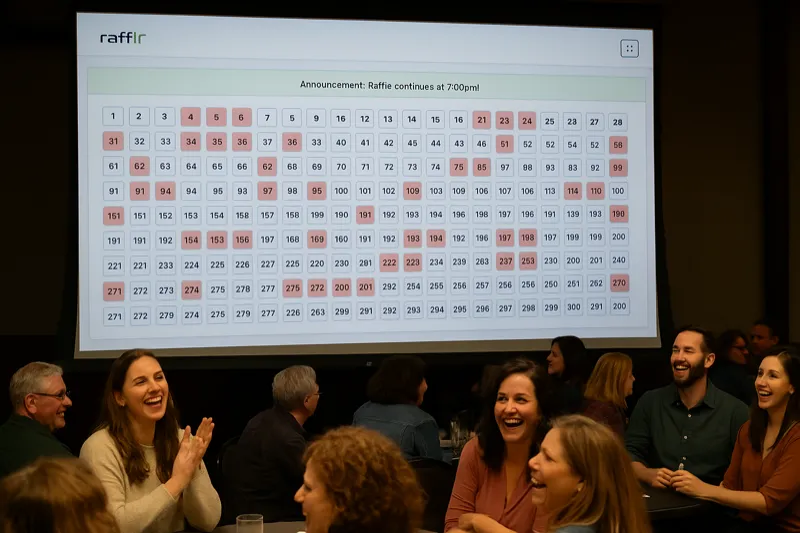
rafflr is a raffle drawing platform purpose-built for live reverse raffles. Rather than generating printable tickets, rafflr creates a digital numbered board for up to 1,000 tickets and manages the live animated drawing from one dashboard. Ticket sales are handled separately.
Best for: Organizations that want to skip printing entirely and run a professional digital raffle with live drawing capabilities.
Pros:
- Automatic ticket numbering up to 1,000
- Built-in sales tracking and participant management
- Live animated drawing with presenter mode
- No printing, no lost tickets, no counterfeiting
- Works for both in-person and remote events
Cons:
- Requires a subscription (no free tier)
- Not designed for producing physical printable tickets
3. TicketPrinting.com Paid
TicketPrinting.com is a dedicated print service that specializes in raffle tickets, event tickets, and drink tickets. You choose from their template library, customize the design online, and they print and ship numbered tickets directly to you. Their raffle tickets come with perforated stubs and sequential numbering as standard features.
Best for: High-quality printed raffle tickets with automatic numbering and perforated stubs.
Pros:
- Professional print quality on thick card stock
- Automatic sequential numbering included
- Perforated stubs for easy tear-off
- Multiple size and color options
Cons:
- Requires lead time for printing and shipping (5-7 business days)
- Higher cost per ticket than printing at home
- Minimum order quantities apply
See rafflr in Action
Watch a 2-minute demo of how easy it is to create and run a reverse raffle with rafflr
4. Eventbrite Freemium
While primarily known as an event ticketing platform, Eventbrite can be used to sell raffle tickets online. You create a raffle event, set up ticket types with pricing, and participants receive digital confirmation emails. It handles payment processing and attendee tracking.
Best for: Selling raffle entries online when you need payment processing and attendee management.
Pros:
- Built-in payment processing
- Email confirmation to buyers
- Well-known platform that participants trust
- Free for free events
Cons:
- Not specifically designed for raffles — no numbered tickets or drawing features
- Service fees on paid tickets (3.7% + $1.79 per ticket)
- No live drawing functionality
5. DesignCrowd Templates Paid
DesignCrowd connects you with freelance designers who create custom raffle ticket designs. You can also browse their marketplace for pre-made raffle ticket templates. This is a good option when you want a completely unique design that matches your brand or event theme.
Best for: Custom-designed raffle tickets when templates are not unique enough.
Pros:
- Access to professional graphic designers
- Fully custom designs tailored to your event
- Multiple design concepts to choose from
Cons:
- More expensive than template-based tools (starts around $100+)
- Longer turnaround time (3-7 days for custom work)
- You still need to handle printing separately
6. Google Docs Templates Free
Google Docs and Google Slides offer free raffle ticket templates that you can find through a quick search or in the template gallery. While basic, these templates are fully editable and accessible to anyone with a Google account. You can duplicate ticket layouts, add your event details, and print directly from your browser.
Best for: Quick, no-cost raffle tickets when design quality is not a top priority.
Pros:
- Completely free
- No account setup beyond Google
- Easy to share and collaborate with others
- Print directly from browser
Cons:
- Very limited design options
- No automatic numbering
- Templates look basic compared to dedicated tools
- Manual formatting required for alignment
7. Jotform Freemium
Jotform is a form-building platform that can be adapted for online raffle entry. You create a form where participants enter their information and optionally pay for tickets. Jotform generates a unique submission ID for each entry, which can serve as a ticket number. It integrates with payment gateways like PayPal and Stripe.
Best for: Online raffle entry forms with payment collection and data capture.
Pros:
- Free tier available (up to 100 submissions/month)
- Payment integration with PayPal and Stripe
- Conditional logic for multiple ticket quantities
- Automatic confirmation emails
Cons:
- Not a true raffle ticket generator — it is a form builder adapted for the purpose
- No visual ticket output or printable tickets
- No drawing or winner selection built in
- Paid plans needed for higher submission volumes
8. MyCreativeShop Freemium
MyCreativeShop specializes in printable marketing materials, including raffle tickets. Their online editor offers raffle-specific templates with built-in numbering features. You can customize designs and order professional prints directly through the platform, or download PDFs to print yourself.
Best for: Printable raffle tickets with built-in numbering and professional print ordering.
Pros:
- Templates designed specifically for raffle tickets
- Built-in sequential numbering feature
- Order prints directly or download PDF
- Perforated ticket options available
Cons:
- Smaller template library than Canva
- Free downloads include watermark — paid plan needed for clean exports
- Print ordering only available in the US
Quick Comparison Table
| Tool | Type | Auto Numbering | Price | Best For |
|---|---|---|---|---|
| Canva | Design | No | Free / $12.99/mo | Custom printable designs |
| rafflr | Digital platform | Yes (up to 1,000) | Paid subscription | Full digital raffle management |
| TicketPrinting.com | Print service | Yes | Per order | Professional printed tickets |
| Eventbrite | Event ticketing | No | Free / fees per ticket | Online entry + payment |
| DesignCrowd | Custom design | No | $100+ | Unique branded designs |
| Google Docs | Template | No | Free | Quick, zero-cost tickets |
| Jotform | Form builder | Submission IDs | Free / $34+/mo | Online entry forms |
| MyCreativeShop | Design + print | Yes | Free / paid exports | Numbered printable tickets |
How to Create Raffle Tickets Online (Step by Step)
Regardless of which tool you choose, the process of generating raffle tickets online follows the same general steps. Here is a walkthrough that applies to most platforms.
Step 1: Define Your Ticket Requirements
Before opening any tool, decide on these basics: How many tickets do you need? Will they be physical or digital? Do you need sequential numbering? What information should appear on each ticket (event name, date, prize, price, contact info, drawing rules)?
Step 2: Choose Your Tool
Use the comparison table above to pick the right generator. If you need printable tickets with a polished design, start with Canva or MyCreativeShop. If you want to skip paper entirely and manage everything digitally, an online raffle platform like rafflr is the most efficient choice.
Step 3: Customize Your Design
For printable tickets, select a template and customize it with your event details. Include the raffle name, date and time of the drawing, prize description, ticket price, and your organization's name and contact information. Keep the design clean and readable — participants need to find essential information at a glance.
Step 4: Add Sequential Numbering
Numbering is critical for tracking who purchased which ticket. Tools like TicketPrinting.com and MyCreativeShop handle this automatically. With Canva or Google Docs, you will need to add numbers manually or use a mail merge workaround. Digital platforms like rafflr assign numbers automatically when tickets are created.
Step 5: Review and Produce
Double-check all text for accuracy, especially the drawing date, prize details, and ticket price. For printable tickets, do a test print of one sheet to verify alignment and sizing before printing the full batch. For digital tickets, test the purchase flow to make sure participants see the correct information.
Step 6: Distribute
Printed tickets can be sold in person, at tables, or through volunteers. Digital tickets can be shared via email, social media, or your organization's website. Digital distribution typically reaches a wider audience and allows you to track sales in real time.
Digital vs Physical Raffle Tickets: Which Should You Choose?
This is one of the most common questions organizers face when setting up a raffle. The answer depends on your event format, audience, and budget. Here is a direct comparison to help you decide.
Physical Raffle Tickets
Physical tickets work best for in-person events where attendees are gathered in one location. They give participants a tangible item they can hold, which adds excitement. Printed tickets with stubs also provide a built-in record-keeping system — you keep the stub, the buyer keeps the ticket.
The downsides are significant: printing costs, the time required to manually track sales, the risk of lost or damaged tickets, and the inability to sell tickets to people who are not physically present.
Digital Raffle Tickets
Digital tickets eliminate printing entirely. Participants receive a numbered ticket through a website or app, and all records are stored automatically. This makes sales tracking instant and accurate. Digital tickets also expand your reach — people can buy tickets from anywhere, not just at the event.
Digital platforms like rafflr take this further by including a live animated drawing that participants can watch in real time, whether they are in the room or joining remotely. This creates an engaging experience that physical tickets cannot match.
Tip: Many successful organizations use a hybrid approach for in-person events — selling physical tickets at tables while also offering digital purchase options for people who cannot attend in person.
Raffle Ticket Numbering Tips
Proper numbering is essential for running a legitimate raffle. Here are practical tips to keep your numbering system organized and trustworthy.
- Start from 1, not 0. Participants expect ticket numbers to begin at 1. Starting from 0 or a random number causes confusion.
- Use sequential numbering only. Random ticket numbers make it harder to verify winners and track unsold tickets. Stick with 1, 2, 3, etc.
- Match stubs to tickets. If using physical tickets with stubs, make sure the number on the stub exactly matches the number on the ticket portion.
- Account for every number. Keep a log of which numbers were sold, which are unsold, and which were voided. This is required for compliance in many jurisdictions.
- Use leading zeros for large raffles. If you are selling 500+ tickets, format numbers as 001, 002, etc. This keeps sorting consistent and prevents display issues.
- Digital platforms handle this automatically. One of the biggest advantages of using software like rafflr is that numbering, tracking, and accounting are all built in. There is no manual work involved.
Frequently Asked Questions
What is the best free raffle ticket generator online?
Canva offers the best free raffle ticket generator for printable designs with hundreds of customizable templates. For digital raffle tickets with automatic numbering and tracking, rafflr provides a complete solution that eliminates the need for physical tickets entirely.
How do I generate numbered raffle tickets online?
You can generate numbered raffle tickets using tools like Canva (manual numbering), TicketPrinting.com (automatic sequential numbering for print), or rafflr (automatic digital numbering for up to 1,000 tickets). For physical tickets, most print services add sequential numbers during the printing process. For digital raffles, software like rafflr handles numbering automatically.
Can I create raffle tickets online for free?
Yes. Canva offers free raffle ticket templates you can customize and download. Google Docs also provides free templates for basic raffle ticket designs. However, free options typically require manual numbering and separate printing. For a fully digital solution, raffle software like rafflr handles ticket generation, numbering, sales tracking, and drawing all in one platform.
What is the difference between a raffle ticket generator and a raffle ticket template?
A raffle ticket template is a static design file you customize with your event details and then print. A raffle ticket generator is a tool or software that creates tickets dynamically — handling numbering, formatting, and sometimes distribution automatically. Templates are best for one-off printable tickets, while generators save time for larger events or recurring raffles.
Do I need physical raffle tickets or can I go fully digital?
Many organizations are switching to fully digital raffle tickets because they eliminate printing costs, prevent lost or counterfeit tickets, and make tracking sales much easier. Digital raffle platforms like rafflr let participants purchase numbered tickets online and watch drawings in real-time. Physical tickets are still preferred for in-person-only events where attendees expect a tangible ticket stub.
When You Don't Need a Ticket Generator
Not every raffle requires a dedicated ticket generator. Before investing time in tools, consider whether your situation actually calls for one. In some cases, simpler methods work just as well -- or better.
- Fewer than 20 tickets: When your raffle is small enough to count on your fingers, hand-numbering tickets takes minutes. A generator adds unnecessary complexity for micro-raffles at family gatherings or small team events.
- Your platform handles numbering automatically: If you are already using raffle software like reverse raffle platforms or event management tools, they typically assign ticket numbers during purchase. A separate generator would just create duplicate work.
- Hand-written tickets suit the event: For intimate charity dinners, church fellowship events, or small club meetings, hand-written tickets can feel more personal and authentic. The imperfection becomes part of the charm, especially when attendees enjoy the tactile experience of tearing a physical stub.
The best tool is the one that matches your event's scale. For anything above 50 tickets or any event where you need professional presentation and accurate tracking, a generator starts earning its keep.
Start Generating Raffle Tickets Today
Whether you choose a free design tool like Canva for printable tickets or a full digital platform like rafflr for end-to-end raffle management, the most important thing is matching the tool to your event's needs. For one-time small events, a free template may be all you need. For recurring fundraisers, charity events, or larger raffles where tracking and professionalism matter, investing in dedicated raffle software pays for itself in time saved and tickets sold.