An electronic raffle draw replaces the traditional hat-and-ticket approach with software that randomly selects winners and displays the results on a screen for the audience. It is faster, more verifiably fair, and creates a significantly better experience for everyone in the room. This guide covers everything you need to know about running an electronic raffle draw, from choosing software to setting up hardware and ensuring compliance.
Electronic vs. Manual vs. Hybrid: Quick Comparison
| Feature | Manual Draw | Electronic Draw | Hybrid |
|---|---|---|---|
| Randomness verification | Difficult to prove | RNG algorithm, auditable | Electronic RNG, physical ticket entry |
| Audience visibility | Front rows only | Full room via projector | Full room via projector |
| Speed | Slow (1-2 min per draw) | Instant to adjustable pace | Moderate |
| Scalability | Difficult above 200 tickets | Varies by software (rafflr supports up to 1,000) | Varies by software and setup |
| Record keeping | Manual logging required | Automatic with timestamps | Automatic with timestamps |
| Equipment needed | Container, tickets | Laptop, projector, software | Laptop, projector, ticket container |
| Audience experience | Traditional, familiar | Professional, engaging | Best of both worlds |
| Best for | Small events under 50 tickets | Events of any size | Organizations transitioning from manual |
What Is an Electronic Raffle Draw?
An electronic raffle draw is a drawing conducted using software rather than physical methods. Instead of pulling paper tickets from a drum, bowl, or cage, the organizer uses a computer program that generates random numbers or selects random entries from a database. The results are typically displayed on a screen -- either a projector, TV, or monitor -- so the audience can watch the draw happen in real time.
The term "electronic raffle draw" is often used interchangeably with "digital raffle draw," though "electronic" sometimes implies the use of specific hardware (projectors, screens, sound systems) as part of the presentation. The core principle is the same: software handles the randomness, and electronic displays communicate the results to the audience.
For a broader look at how electronic tools fit into the raffle landscape, our raffle drawing tools comparison reviews the full range of options from manual to fully electronic.
Electronic vs. Manual Raffle Draws
The fundamental difference between electronic and manual draws is how randomness is generated and how results are communicated to the audience.
How Manual Draws Work
In a manual draw, physical ticket stubs are placed in a container and one is selected by hand. The selection is visible to nearby observers, but people at the back of a large room often cannot see what is happening. The randomness depends on how well the tickets were mixed, which is hard to verify.
How Electronic Draws Work
In an electronic draw, software uses a random number generator (RNG) to select numbers. The RNG produces results that are statistically random -- every ticket has exactly the same probability of being selected, regardless of when it was entered or where it appears in the database. The results are displayed on a screen that everyone can see, with animations and visual effects that enhance the experience.
Key Advantages of Electronic Draws
- Provable fairness: RNG algorithms can be mathematically verified. Physical mixing cannot.
- Scalability: Electronic draws work identically whether you have 50 tickets or 5,000.
- Speed: Results are instant. No fumbling with ticket stubs.
- Visibility: Everyone in the room sees the same display, regardless of where they are sitting.
- Automation: Auto-pull features let the software draw at a set pace, freeing the emcee to engage the audience.
- Records: Every draw is automatically logged with timestamps.
See rafflr in Action
Watch a 2-minute demo of how easy it is to create and run a reverse raffle with rafflr
Electronic Raffle Draw Software Options
The software you choose for your electronic raffle draw determines the quality of the experience. Here are the main categories, from basic to purpose-built.
Basic Random Number Generators
Tools like Random.org or Google's built-in random number feature generate a random number within a range. They are free and genuinely random, but they provide no visual presentation, no audience display, and no raffle-specific features.
Use case: Quick informal draws where you just need a number and do not care about presentation.
Spreadsheet-Based Solutions
Some organizers build electronic draws in Excel or Google Sheets using RAND() functions and conditional formatting. This can work but requires significant setup, is prone to errors, and is not visually impressive when projected.
Use case: Budget-conscious organizers with spreadsheet skills running small events.
Generic Picker/Spinner Tools
Wheel of Names, random picker apps, and similar tools add visual flair with spinning wheels or animated selections. They are more engaging than plain random numbers but not designed for raffle-specific workflows like reverse draws, ticket grids, or multi-round drawings.
Use case: Classroom activities, casual giveaways, or events where the draw format is very simple.
Dedicated Raffle Draw Software
Purpose-built platforms like rafflr are designed specifically for electronic raffle draws at live events. They combine random number generation with professional presentation features:
- Full-screen presenter mode optimized for projection on large screens
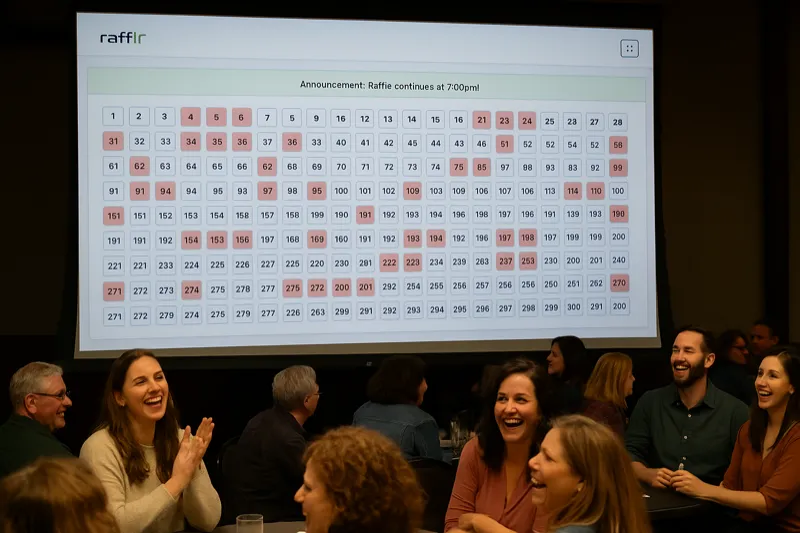
- Ticket grid display where the audience follows eliminations in real time; large boards scroll on smaller viewports to preserve readable labels
- Auto-pull with speed control for pacing the draw to match the room's energy
- Reverse raffle support with elimination tracking and last-ticket detection
- Offline capability so the draw works even without internet
- Automatic record-keeping for compliance and documentation
Use case: Live events of any size where the drawing is a featured part of the program.
For a side-by-side comparison of these categories, see our best raffle app guide.
Hardware Setup for Electronic Raffle Draws
The software is only half of the equation. The hardware setup determines how well the audience can see and experience the electronic draw. Here is what you need and how to configure it.
Essential Hardware
- Laptop or tablet: Runs the raffle software. Any modern device with a web browser works. Bring a charger.
- Projector or large display: Shows the draw to the audience. Brightness matters -- aim for at least 3,000 lumens for a room with ambient lighting.
- HDMI cable or wireless adapter: Connects the laptop to the display. Wired connections (HDMI) are more reliable than wireless (Chromecast, AirPlay). Bring adapters for your specific laptop ports.
- Projection screen or white wall: A proper screen provides the best image quality, but a flat white wall works in a pinch.
Optional but Recommended
- Sound system: If your software includes sound effects, connect to the venue's audio system or bring a portable Bluetooth speaker.
- Backup device: A second laptop or tablet with the raffle loaded, in case the primary device fails.
- Extension cord / power strip: Event venues never have enough outlets where you need them.
- Clicker / wireless presenter remote: Lets the emcee advance the draw from across the stage instead of standing at the laptop.
Setup Checklist for Event Day
- Arrive early enough to test everything before guests arrive
- Connect laptop to projector and verify the display works
- Open the raffle software and load your raffle data
- Test the draw -- pull a few numbers to confirm everything functions
- Adjust the projector position so the screen is visible from every seat
- Test sound if applicable
- Set the laptop to "Do Not Disturb" mode to prevent notification pop-ups during the draw
- Disable screen saver and auto-sleep settings
- Keep the laptop plugged in throughout the event
Running the Electronic Draw: Best Practices
With your software and hardware ready, here is how to execute the electronic draw itself for maximum impact and fairness.
Before the Draw
- Verify your ticket data: Confirm that the number of tickets in the software matches your sales records. Exclude any unsold numbers.
- Brief the emcee: Make sure whoever is narrating the draw understands the software, the format (standard vs. reverse), and the pacing plan.
- Explain the process to the audience: Before the first number is drawn, tell the audience how the electronic draw works. A brief explanation builds trust.
During the Draw
- Start at a moderate pace: For reverse raffles, begin with auto-pull at a comfortable speed. The audience needs time to check their tickets and react.
- Adjust speed as you go: Speed up during the middle phase when eliminations are less dramatic. Slow down significantly for the final 10-20 tickets.
- Let the emcee work: The software handles the drawing. The emcee should focus on commentary, audience engagement, and building energy.
- Pause for side pots: If your event includes consolation prizes or side bets at certain milestones (e.g., every 50th elimination), pause the auto-pull for those moments.
After the Draw
- Display the winner prominently: Keep the winning number on screen while the winner is identified and comes forward.
- Save the results: Export or screenshot the complete draw history. The software logs this automatically, but having a backup never hurts.
- Document for compliance: Note the draw date, time, method, total tickets, winning number, and winner name for your records.
Compliance and Fairness for Electronic Draws
Electronic raffle draws are subject to the same regulations as manual draws, plus some additional considerations related to the electronic format.
Regulatory Requirements
Most jurisdictions that allow raffles accept electronic drawing methods. However, some states or localities may have specific requirements about:
- The type of random number generator used (some may require specific certifications)
- Public visibility of the draw process
- Record retention periods and formats
- Independent oversight for prizes above certain values
Always check your local regulations before running an electronic draw. Our raffle laws guide provides a starting point for understanding state-level requirements.
Demonstrating Fairness
The visual nature of electronic draws is actually an advantage for demonstrating fairness. With a projected electronic drawdown board, every person in the room can see every ticket and watch the draw happen in real time. There is no hidden container, no sleight of hand, and no question about whether the draw was properly mixed.
To further strengthen trust:
- Explain the RNG process briefly before the draw begins
- Have a volunteer verify the software settings before the first draw
- Keep the complete draw log available for anyone who requests it after the event
- For high-value prizes, consider having an independent auditor present
Electronic Raffle Draw for Different Event Types
Electronic draws work well across many event types. Here is how to optimize the setup for each.
Charity Galas and Dinner Events
These are the ideal setting for electronic draws. A large projection screen, a reverse raffle format, and an energetic emcee create an experience that drives donations and ticket sales for future events. Use rafflr's auto-pull with gradual speed reduction for maximum suspense.
School and PTA Fundraisers
Electronic draws add professionalism to school events and are easier to manage than manual methods when dealing with large numbers of tickets. The visual display keeps kids and parents engaged.
Corporate Events and Team Building
Electronic raffles at corporate events benefit from the professional appearance and fairness guarantees. The visual display makes the draw a shared experience rather than a background activity.
Sports League and Club Events
Sports organizations often run reverse raffles as major fundraisers. Electronic draws handle the large ticket counts common in these events and create the competitive energy that sports audiences enjoy.
Virtual and Hybrid Events
For events with remote participants, screen-share or livestream the electronic draw. The visual display translates perfectly to video, unlike manual draws which are difficult to film clearly.
Why rafflr Is Built for Electronic Raffle Draws
rafflr was designed from the ground up for exactly this use case: running electronic raffle draws at live events. Every feature is focused on the draw experience.
- Presenter mode fills the entire screen with a high-contrast ticket grid that is readable from across a banquet hall
- The responsive grid adjusts for up to 1,000 tickets. Large TVs and 1080p projectors can show the full grid; smaller laptop and mobile viewports scroll vertically for readability.
- Auto-pull with adjustable speed lets you set the pace and change it on the fly as the draw progresses
- Built-in reverse raffle support tracks eliminations, detects the last ticket standing, and handles side pots
- Offline capability means the draw runs without internet -- critical for event venues with unreliable Wi-Fi
- No audience installation needed -- project from one device and everyone in the room is engaged
Whether you are running your first electronic raffle draw or your fiftieth, rafflr provides the tools to make every draw professional, fair, and exciting.
Frequently Asked Questions
What is an electronic raffle draw?
An electronic raffle draw is a drawing conducted using software rather than physical methods. The software uses a random number generator to select winners and displays results on a screen so the audience can watch in real time.
Is an electronic raffle draw legally accepted?
Yes, in most jurisdictions that allow raffles. The key requirements are that the selection is genuinely random, the process is transparent, and proper records are maintained. Check your local regulations for any specific requirements about electronic drawing methods.
What hardware do I need?
At minimum, a laptop or tablet. For live events, add a projector or large screen and an HDMI cable. Optionally, a sound system, backup device, and wireless presenter remote enhance the experience.
Can I run an electronic raffle draw without internet?
Rafflr requires an internet connection to authenticate the organizer and save each draw securely. For event night, connect through reliable venue internet and keep a phone hotspot available as a backup connection.
How do I prove the draw was fair?
Rafflr uses server-side cryptographic random selection, an audience-facing display, and timestamped saved results. It is not independently certified. For high-stakes events, retain the exported results and have an independent observer present.
When Electronic Draws Aren't Necessary
Electronic raffle draws are the better choice for most events, but there are situations where the traditional approach works just fine -- or is even preferable.
- Small events under 30 tickets. If you are drawing from a pool of 20-30 tickets at a committee meeting or small gathering, the setup time for a laptop and projector outweighs the benefit. A well-mixed bowl and a clear announcement is perfectly adequate.
- Audiences who prefer the traditional feel. Some communities have a long tradition of physical ticket draws, and the tactile experience of pulling a ticket from a drum is part of the event's charm. If your audience values tradition over efficiency, forcing an electronic format can feel impersonal. Read the room.
- When regulations require physical draws. A small number of jurisdictions have specific requirements about how raffle drawings must be conducted. While rare, some may mandate a physical drawing method or require specific certification for electronic RNG systems. Always check your local raffle regulations before deciding on a format.
The honest answer is that most events benefit from electronic draws, but not every event needs one. If your raffle is small, your audience prefers tradition, or your local rules require a physical draw, do not feel pressured to go electronic.
Upgrade Your Raffle Draw to Electronic
The shift from manual to electronic raffle draws is not about replacing tradition -- it is about improving every aspect of the experience. Fairer randomness, better visibility, more excitement, and automatic documentation. If you are still pulling tickets from a hat, it is time to upgrade.