Choosing the right pick a winner app can mean the difference between a smooth, professional drawing and a frustrating mess. Whether you need a random winner generator app for a charity raffle, a raffle winner picker for your school fundraiser, or a simple random drawing app for an office giveaway, the options in 2026 range from completely free tools to full-featured platforms that manage tickets, entries, and live presentations. We tested 10 of the most popular apps so you can skip the trial and error.
Quick Verdict
Best for Live Reverse Raffle Draws: rafflr - Number tracking, live drawing controls, and presenter mode
Best Free Random Winner Generator: Random.org - Truly random selection with decades of trust
Best for Social Media Giveaways: Woobox - Automated entry collection from Instagram, Facebook, and more
Best Random Name Drawing App: Wheel of Names - Visual spinning wheel perfect for classrooms and small groups
Best for Website Contests: Rafflecopter - Embeddable widget with multiple entry methods
Quick Comparison: All 10 Pick a Winner Apps at a Glance
Before diving into detailed reviews, here is how all 10 random drawing apps stack up on the features that matter most. This table covers pricing, entry limits, live drawing support, and what each tool does best.
| App | Best For | Price | Key Feature | Free Option | Max Entries | Live Drawing | Rating |
|---|---|---|---|---|---|---|---|
| rafflr | Fundraising raffles | $77/event, $97/yr, $497 lifetime | Presenter mode with animations | No | Unlimited | Yes | 4.8/5 |
| Random.org | Simple, trustworthy draws | Free / $5/mo | True randomness (atmospheric noise) | Yes | 10,000 | No | 4.5/5 |
| Wheel of Names | Classrooms, meetings | Free / $7/mo | Visual spinning wheel | Yes | ~400 | Spin wheel | 4.4/5 |
| Woobox | Social media giveaways | $37/mo | Auto entry from social platforms | Limited | Unlimited | No | 4.3/5 |
| Rafflecopter | Website contests | Free / $13/mo | Embeddable giveaway widget | 1 giveaway | Unlimited | No | 4.2/5 |
| AhaSlides | Presentations, events | $7.95/mo | Audience participation + spin wheel | 7 entries | 10,000 | Spin wheel | 4.2/5 |
| Google RNG | Instant number draws | Free | Zero setup, built into search | Yes | N/A | No | 3.7/5 |
| RandomPicker | Weighted drawings | Free | Weighted entries + shareable results | Yes | 1,000 | No | 4.0/5 |
| MiniWebTool | Quick name picks | Free | Paste-and-pick simplicity | Yes | 10,000 | No | 3.8/5 |
| AppSorteos | Instagram giveaways | $9.99/draw | Instagram comment scraping + bot filter | No | Varies | No | 3.5/5 |
What Is a Pick a Winner App?
A pick a winner app is any digital tool that randomly selects one or more winners from a pool of entries. The category is broad. It includes everything from Google's built-in random number generator to full-featured raffle apps that manage ticket sales, participant databases, and live drawing presentations. You might also hear these called random winner generator apps, raffle winner pickers, random drawing apps, or prize draw software. They all solve the same fundamental problem: selecting a winner fairly and randomly.
The best pick a winner app for you depends on what kind of drawing you are running:
- Quick office drawing - A free random name picker that selects from a pasted list
- Fundraising raffle - A raffle winner picker with ticket management, live animations, and audience presentation
- Social media giveaway - An app that scrapes comments and picks a winner from followers
- Large-scale prize draw - Enterprise prize draw software with compliance documentation and audit trails
- Classroom or team meeting - A random drawing app with visual animations that keeps people engaged
- Reverse raffle fundraiser - Specialized reverse raffle software that eliminates names one at a time until the last person standing wins
Detailed Reviews: 10 Best Pick a Winner Apps for 2026
1. rafflr
Best for: Live Reverse Raffle Draws and Presenter BoardsPrice: $77 per live raffle, $97/year, or $497 lifetime | Practice mode: Included
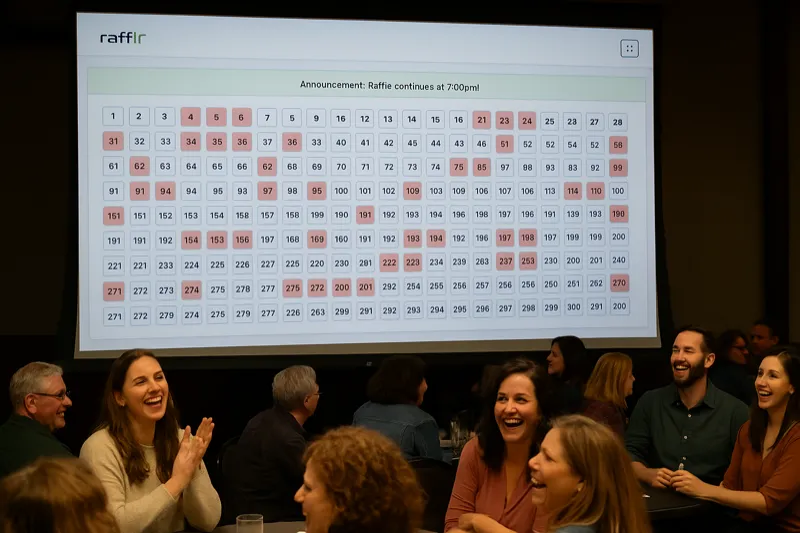
rafflr is purpose-built drawing and presentation software for live reverse raffles. The organizer supplies the numbered ticket range, then uses Random Draw or records numbers pulled from a physical barrel while rafflr updates the presenter board for the audience.
What genuinely sets it apart is the presenter view. You connect a projector or large display, and the drawing plays out with professional animations, sound effects, and confetti. For nonprofits, schools, and clubs that run raffles as fundraising events, this turns a simple number draw into entertainment that keeps your audience engaged and excited. It also supports sponsor branding on the presenter screen, which helps offset event costs.
Rafflr tracks called, excluded, and remaining numbers rather than participant identities. It does not sell tickets, collect entries or participant payments, operate raffles, provide prizes, maintain donor records, or notify winners. Those responsibilities remain with the event organizer and its approved systems.
Pros:
- Random Draw and physical barrel-entry workflows
- Number tracking for up to 1,000 tickets
- Live drawing animations on presenter screen
- Sponsor branding on presenter display
- Buybacks, ticket exclusions, saved state, and exports
- Browser-based with no desktop installation
Cons:
- No ticket sales or participant payment processing
- No donor CRM, participant names, or winner notifications
- Requires an internet connection
- No social media comment-scraping features
- Focused on numbered live-event drawings
Bottom line: Choose rafflr when the organizer already handles ticket distribution and needs a clear, recoverable live draw with a professional audience display. Choose another platform when the primary need is ticket sales, entry collection, donor management, or social-media winner selection.
2. Random.org
Best for: Simple, Trustworthy Random DrawingsPrice: Free | Premium: $5/month
Random.org has been the internet's most trusted random winner generator app since 1998. It uses atmospheric noise rather than pseudo-random algorithms to generate selections, which makes it one of the few truly random pick a winner tools available. Their random number generator, list randomizer, and drawing tools are used by millions of people worldwide for everything from picking contest winners to determining draft orders.
The free tier handles most use cases. You paste in a list of names or set a number range and the app picks a winner instantly. The premium tier adds features like third-party draws (where Random.org certifies the result) and higher usage limits. The certification feature is valuable for high-stakes drawings where you need an independent verification of fairness.
Pros:
- Truly random (atmospheric noise)
- Free for basic use
- No registration required
- Decades of trust and reputation
- Third-party certified draws (premium)
- API available for developers
Cons:
- No participant management
- Plain, utilitarian interface
- Manual data entry only
- No live drawing animations
- No mobile app
Bottom line: The gold standard for fair, simple random drawings. If you already have your entry list and just need a trustworthy random winner generator app with no frills, Random.org is hard to beat.
3. Wheel of Names
Best for: Classrooms, Meetings, and Small Group DrawingsPrice: Free | Pro: $7/month
Wheel of Names is one of the most popular random name drawing apps, and for good reason. You add names to a colorful spinning wheel, click spin, and it visually selects a winner with a satisfying animation that creates genuine suspense. Teachers, meeting facilitators, and anyone running a small random draw love it because the visual element makes the selection feel more exciting and transparent than a plain text result.
The free version is generous - you get unlimited spins, customizable colors, sound effects, and the ability to remove winners from the wheel after each spin (useful for drawing multiple prizes). The Pro version adds features like saving multiple wheels, removing the logo, and advanced customization. It works well on projectors, making it a solid pick a winner app for in-person events with smaller groups.
Pros:
- Visually engaging spinning wheel
- Completely free for basic use
- No registration required
- Customizable colors and sounds
- Works great on projectors/screens
- Can remove winners between spins
Cons:
- Not practical for large drawings (100+ names)
- No ticket or entry management
- Names must be entered manually
- No weighted entry support
- Wheel becomes unreadable with many names
Bottom line: The most fun random name drawing app for small groups. Great for classrooms, team meetings, and casual giveaways where visual excitement matters more than scale.
See Professional Winner Selection in Action
Watch how rafflr turns a random drawing into an exciting live experience with animations, sound effects, and on-screen reveals
4. Woobox
Best for: Social Media GiveawaysPrice: $37/month | Free plan: Limited features
Woobox is the go-to pick a winner app for social media giveaways. It integrates directly with Facebook, Instagram, YouTube, and X (Twitter) to automatically collect entries from comments, likes, shares, or hashtags. Once your giveaway period ends, the app draws names at random and filters out duplicate accounts and bots. For brands and influencers running frequent social giveaways, it eliminates the tedious process of manually collecting and deduplicating entries.
Beyond basic winner selection, Woobox supports bonus entry methods (follow this account, tag a friend, visit a page), age and location gating for compliance, and a detailed analytics dashboard that shows entry sources and engagement metrics. The platform also supports coupons, polls, and landing pages, making it a broader marketing tool beyond just picking winners.
Pros:
- Direct social media integration (4 platforms)
- Automated entry collection and deduplication
- Bot and fraud detection
- Multiple entry methods and bonus entries
- Detailed analytics dashboard
- Age and location gating
Cons:
- $37/month is steep for occasional use
- Social media focused only
- No live event drawing features
- Learning curve for first-time setup
- Free plan is very limited
Bottom line: If you run frequent social media giveaways and need an app for picking a winner from Instagram comments or Facebook posts, Woobox is worth the monthly cost. For one-off giveaways, the price is hard to justify.
5. Rafflecopter
Best for: Website-Based Contests and SweepstakesPrice: Free (1 active giveaway) | Paid: From $13/month
Rafflecopter is a widely-used random drawing app that lets you embed giveaway widgets directly on your website or blog. Participants enter by completing actions like following social accounts, visiting pages, or answering questions. The platform then handles the random drawing and winner selection automatically. It has been around since 2011 and powers thousands of giveaways for bloggers, e-commerce brands, and marketing teams.
The embeddable widget is Rafflecopter's biggest advantage. You copy a snippet of code, paste it into your site, and you have a fully functional contest entry form without building a separate landing page. The free plan lets you run one active giveaway at a time, which is enough to test the platform. Paid plans unlock unlimited giveaways, premium entry options, and analytics.
Pros:
- Embeddable widget for any website
- Multiple entry methods (social, email, custom)
- Free plan available
- Built-in winner selection
- Easy setup with no coding
- Established platform (since 2011)
Cons:
- Free plan limited to 1 active giveaway
- Interface looks dated
- No live drawing visuals
- Limited customization on free tier
- Widget styling can clash with your site design
Bottom line: A solid, established choice for bloggers and marketers running website-based contests. The free plan is a good way to test the platform before committing.
6. AhaSlides
Best for: Live Presentations and Event DrawingsPrice: Free for up to 7 participants | Paid: From $7.95/month
AhaSlides is a presentation tool that includes a random drawing app feature as part of its interactive slide deck. Audience members join on their phones via a code, and you can run live polls, quizzes, Q&A sessions, and winner drawings. The spinning wheel animation is engaging and works well on conference screens and projectors. If you already use AhaSlides for presentations, the built-in random picker is a natural fit.
The real value here is combining the drawing with other interactive elements. You can run a quiz, collect audience votes, and then draw a prize winner - all within the same presentation. For conferences and corporate events, this integration is more polished than switching between a slide deck and a separate pick a winner app.
Pros:
- Visual spinning wheel animation
- Real-time audience participation via phones
- Part of a full presentation suite
- Sound effects and customization
- Works on any device with a browser
Cons:
- Free plan limited to 7 participants
- Requires internet connection for audience
- No ticket or entry management
- Not designed for raffles specifically
- Overkill if you only need random selection
Bottom line: A good pick if you are already doing presentations and want to add a random drawing as part of the experience. Not ideal as a standalone winner picker tool.
7. Google Random Number Generator
Best for: Instant, Zero-Setup Number DrawsPrice: Free
This is the simplest random drawing app possible. Search "random number generator" on Google and a widget appears right in the search results. Set a minimum and maximum number, click Generate, and you have a winner. Assign each participant a number beforehand and you have a functional (if basic) pick a winner system. It requires zero setup, no account, no app, and takes about five seconds.
The obvious limitations are equally clear. There is no name support, no record of the draw, no animations, and no way to prevent someone from simply generating again until they get a number they prefer. For anything beyond the most casual, trust-based drawing among friends, you need something more robust.
Pros:
- No app to install or website to visit
- Instantly available on any device
- Completely free, no ads
- Trusted source (Google)
- Works offline (cached widget)
Cons:
- Numbers only, no names
- No record or proof of the draw
- No animations or visual appeal
- Manual number-to-name mapping required
- Easy to manipulate (just generate again)
Bottom line: When you need to pick a random number in five seconds flat, nothing is faster. But for anything beyond the most casual drawing, you will want a real random winner generator app.
8. RandomPicker
Best for: Free Drawings with Weighted EntriesPrice: Free
RandomPicker offers more functionality than you would expect from a free random drawing app. It supports weighted entries (so participants with more tickets get proportionally more chances), multiple winner selection, and team generation. It also provides a shareable results page you can send to participants as proof of a fair drawing - a feature many paid apps charge for.
The weighted entry feature is particularly useful for online raffles where some participants purchased more tickets than others. Instead of entering names multiple times, you assign a weight to each entry and the app adjusts the probability accordingly. This is the main reason to choose RandomPicker over simpler free alternatives.
Pros:
- Weighted entry support (free)
- Multiple winner selection
- Shareable results page for proof
- Team/group creation tool
- No account required
Cons:
- Ad-supported interface
- Limited to 1,000 entries
- Cluttered, dated design
- No customer support
- No live drawing animations
Bottom line: The best free random winner generator app for users who need weighted drawings or multiple winners without spending anything. The ads and 1,000-entry limit are the trade-offs.
9. MiniWebTool Random Name Picker
Best for: Quick, One-Time Name DrawingsPrice: Free
MiniWebTool's random name picker is as straightforward as a random name drawing app gets. Paste a list of names (one per line), click a button, and it picks a winner. No registration, no setup, no options to configure. For a quick drawing at a team meeting or small event, the simplicity is a feature, not a limitation. You can also set it to pick multiple winners at once, which saves time for multi-prize drawings.
Pros:
- Zero setup required
- Works on any device with a browser
- Copy-paste name list input
- Instant results
- Option to pick multiple winners
Cons:
- Very basic - no animations or effects
- No save or history functionality
- Ad-heavy experience
- No verification or proof of draw
- No weighted entries
Bottom line: When you need to draw a name in under 30 seconds and never think about it again, MiniWebTool does the job. It is the duct tape of random drawing apps.
10. AppSorteos
Best for: Instagram-Specific GiveawaysPrice: From $9.99/draw | Monthly plans: From $19/month
AppSorteos is a giveaway winner app built specifically for Instagram. It scrapes comments, mentions, and hashtags from your posts, filters out bot accounts and duplicate entries, and picks a winner at random. It also generates a certificate of validity that you can share to prove the drawing was fair - important for maintaining trust with your audience when giving away valuable prizes.
The per-draw pricing model ($9.99 per giveaway) makes it accessible for businesses that run occasional Instagram contests without committing to a monthly subscription. For frequent users, the $19/month plan offers unlimited draws. The certificate of validity feature gives it an edge over manually picking winners from Instagram comments.
Pros:
- Built specifically for Instagram
- Bot and fake account detection
- Certificate of validity included
- Checks if winner follows your account
- Per-draw pricing option (no subscription needed)
Cons:
- Instagram only (no other platforms)
- Per-draw pricing adds up for frequent use
- No live drawing visuals
- Dependent on Instagram API access
- Interface only in English and Spanish
Bottom line: If Instagram giveaways are a core part of your marketing strategy, AppSorteos saves time on entry collection and bot filtering. For multi-platform giveaways, Woobox is the better investment.
How to Choose the Right Pick a Winner App
With 10 different random drawing tools on this list, narrowing down the right raffle winner picker comes down to answering a few key questions about your specific situation. Use this checklist to quickly identify which category of tool you need.
1. What Type of Drawing Are You Running?
This is the single most important factor. Different types of drawings have fundamentally different requirements:
- One-time random name draw: Use a free tool like Random.org, Wheel of Names, or MiniWebTool
- Recurring fundraising raffle: Invest in a dedicated raffle winner picker like rafflr that handles the full process
- Reverse raffle fundraiser: Use reverse raffle software with elimination-style drawing animations
- Social media giveaway: Choose Woobox or AppSorteos for automated entry collection from comments and followers
- Website-based contest: Rafflecopter embeds directly on your site without coding
- Live event with an audience: Pick something with visual animations (rafflr, AhaSlides, Wheel of Names)
2. How Many Entries Do You Need to Handle?
Free tools often have entry limits that matter. RandomPicker caps at 1,000 entries. Wheel of Names becomes visually unreadable and impractical above a few hundred names. AhaSlides limits the free tier to just 7 participants. If you regularly draw from large pools of hundreds or thousands of entries, make sure the app can handle your volume without performance issues or upgrade requirements.
3. Do You Need Proof of Fairness?
For high-stakes drawings where real money or valuable prizes are involved, participants want assurance the selection was random and unbiased. Look for apps that offer result documentation, draw certificates, or recording of the drawing process. Random.org offers certified third-party draws. AppSorteos provides validity certificates. rafflr records the entire drawing sequence with its live presenter mode. These features matter when trust is critical.
4. Does the Visual Presentation Matter?
If you are announcing a winner in front of a live audience at a gala, fundraiser, company event, or conference, the visual presentation of the drawing matters as much as the randomness itself. A plain number on a screen is anticlimactic. Look for apps with live drawing animations, sound effects, and screen-optimized displays that create suspense and excitement.
5. What Is Your Budget?
The range across these 10 apps goes from completely free to $37 per month. Consider how often you will use the tool and what the cost per drawing works out to. A $97/year platform like rafflr costs less than $2 per week for an organization that runs multiple events annually. A $37/month tool like Woobox makes sense only if you run social giveaways frequently enough to justify the ongoing cost. For one-off drawings, free tools are perfectly adequate.
Red Flags to Watch For
Regardless of which pick a winner app you choose, be wary of these warning signs:
- No information about how randomization works
- Requires excessive account permissions or data access
- Hidden fees or surprise entry limits after you start using the tool
- No customer support or documentation
- Reviews mentioning fairness concerns or manipulated results
- No HTTPS or basic security on the platform
Free vs Paid: What You Actually Get
One of the first questions people ask when searching for a random drawing app is whether a free tool will do the job or if they need to pay. The answer depends on the stakes, scale, and frequency of your drawings.
When a Free Pick a Winner App Is Enough
Free random winner generator apps like Random.org, Wheel of Names, RandomPicker, and MiniWebTool work well when:
- You are running a one-time drawing with a small group (under 100 people)
- The prize is informal (gift card, bragging rights, office perk)
- You do not need a formal record or audit trail of the drawing
- You already have your participant list ready to paste in
- There are no legal or compliance requirements for the drawing
- The drawing does not need to be projected for an audience
The main limitation of free tools is that they handle only the selection step. You manage entries, communicate with participants, and document results on your own. For a casual office drawing, classroom activity, or small group giveaway, that overhead is minimal and perfectly manageable.
When Paying for a Raffle Winner Picker Makes Sense
Paid prize draw software and raffle draw apps earn their cost when:
- You run raffles or drawings regularly (monthly, quarterly, annually)
- Real money is involved - ticket sales, entry fees, or valuable prizes worth hundreds or thousands of dollars
- You need an audit trail or verifiable proof of fairness for participants or regulators
- The drawing is part of a live event with an audience watching
- You need to manage hundreds or thousands of entries with ticket assignments
- Compliance, tax reporting, or raffle law requirements apply to your drawing
- Professional presentation matters for your organization's reputation
The cost of a paid tool is almost always less than the time you would spend cobbling together spreadsheets, random number generators, and email notifications to do the same thing manually. For organizations that run raffles as fundraisers, a professional platform also adds credibility that encourages higher ticket sales and repeat participation.
Key Features to Compare in Any Random Winner Generator App
Randomization Method
Not all pick a winner apps generate random results the same way. The differences can matter depending on your use case:
- Pseudo-random algorithms (PRNG) - Used by most apps. Computer-generated sequences that are statistically random and perfectly adequate for the vast majority of drawings
- Atmospheric noise - Random.org's approach. Truly unpredictable, based on physical phenomena in the atmosphere
- Cryptographic randomness (CSPRNG) - Used by some enterprise prize draw software. Extremely secure but usually overkill for standard raffles and giveaways
For most raffle drawings, pseudo-random selection is more than fair enough. The perception of fairness through transparency and documentation often matters more than the specific randomization algorithm. If someone questions whether the drawing was fair, being able to show a recorded drawing or a verifiable results page carries more weight than explaining atmospheric noise.
Entry Management
How does the app handle getting participants into the drawing? The options range from manual data entry to fully automated collection:
- Manual entry - You type or paste names/numbers (Random.org, MiniWebTool, Wheel of Names)
- Ticket-based - Participants buy or receive numbered tickets that enter them into the drawing (rafflr)
- Social scraping - Automatically collects entries from social media comments and interactions (Woobox, AppSorteos)
- Form/widget - Participants enter through an embedded form on your website (Rafflecopter)
- Audience join code - Participants enter a code on their phones to be added to the drawing pool (AhaSlides)
Live Drawing and Visual Presentation
For events, presentations, and public-facing drawings, the way a winner is announced matters enormously. Some apps display a plain text result. Others offer spinning wheels, scrolling animations, dramatic countdowns, or full-screen presenter modes with sound effects. If you are projecting the drawing for an audience, visual presentation is often the key differentiator among these tools - and the feature that determines whether attendees remember the drawing or forget it five minutes later.
Common Mistakes When Using a Pick a Winner App
Even with the right tool, these common errors can undermine your drawing:
-
Not doing a test run before the real drawing
Always run a practice draw with dummy data to make sure you understand how the app works. Technical difficulties during a live drawing are embarrassing and undermine trust in the fairness of the process.
-
Leaving duplicate entries in the list
Unless your drawing intentionally allows multiple entries per person (like a raffle where people buy multiple tickets), clean your list before drawing. Most free apps do not catch or flag duplicates for you.
-
Choosing the wrong tool for the job
A simple Instagram giveaway does not need enterprise raffle software. A 500-person fundraiser should not rely on a Google random number generator. Match the sophistication of the tool to the scale and stakes of your drawing.
-
Not documenting the results
Screenshot, screen record, or use an app that provides verifiable results. If anyone questions the fairness later, you need proof. Some apps like Random.org and AppSorteos provide this automatically; with basic free tools, you have to capture it yourself.
-
Ignoring legal requirements for prize drawings
Depending on your location and the prize value, random drawings may be subject to specific regulations around gambling, sweepstakes, or lottery laws. Check your local and state rules before you draw, especially if entry requires a purchase. Our raffle laws guide covers the basics for US-based organizations.
Frequently Asked Questions
What is the best free pick a winner app?
For simple random drawings, Random.org is the best free option because it uses atmospheric noise for true randomness and requires no signup. For visual drawings with a spinning wheel, Wheel of Names is the best free pick a winner app. RandomPicker is the best free option if you need weighted entries or multiple winner selection.
Are pick a winner apps truly random?
Most pick a winner apps use pseudo-random number generators (PRNGs), which are algorithmically random and more than fair enough for raffles and giveaways. Random.org is the exception, using atmospheric noise for true randomness. For practical purposes, both methods produce results that cannot be predicted or manipulated, making them suitable for fair winner selection.
Can I use a pick a winner app for a legal raffle or sweepstakes?
Potentially, but legal compliance depends on your location, organization, and drawing type. The app itself does not make a raffle legal or illegal. Organizers should confirm applicable laws, licensing, eligibility, record-keeping, and drawing requirements with the appropriate authority or qualified counsel. Rafflr records the number-drawing state and supports result export; it does not certify legal compliance.
What is the difference between a raffle app and a random name picker?
A random name picker selects from a pasted list. Raffle tools vary: some sell tickets or collect entries, while focused drawing tools such as rafflr handle the numbered draw and audience presentation after an organizer has distributed tickets through approved channels.
How do I pick a winner from Instagram or Facebook comments?
Use a social media giveaway tool like Woobox or AppSorteos. These apps connect to your social media accounts, automatically scrape comments and entries from your posts, filter out bots and duplicate accounts, and randomly select a winner. Woobox supports Facebook, Instagram, YouTube, and X (Twitter). AppSorteos specializes in Instagram-only giveaways with per-draw pricing starting at $9.99.
Which Pick a Winner App Should You Use?
After testing all 10 of these random drawing tools, here is the short version:
- Running a live reverse raffle after tickets are distributed? Use rafflr for the numbered draw, presenter board, sponsor recognition, buybacks, and exclusions.
- Need a quick, free, trustworthy random draw? Random.org is the standard. No signup, no cost, truly random results.
- Want a visual spinning wheel for a small group? Wheel of Names is fun, free, and works on any screen.
- Running social media giveaways regularly? Woobox automates the tedious parts of picking giveaway winners across multiple platforms.
- Need to embed a contest on your website? Rafflecopter is established, proven, and has a free tier to get started.
- Just need a random number right now? Google's built-in generator is one search away.
The best pick a winner app is the one that matches your specific drawing type, audience size, and budget. Use this comparison to narrow your options, then test the one or two that fit before committing. For organizations that run regular raffle fundraisers and want to turn their drawings into memorable events, get started with rafflr today.